Family Foqos
Focus for the
whole family
Bring intentional screen time to everyone. Physical NFC and QR blocking, parent controls, and locked profiles - because focus is a family affair.
Everything you need for
family focus
Powerful blocking tools meet family management. Control screen time across all your family's devices with physical triggers and secure profiles.
New in Family Foqos
5 NEWParent Mode
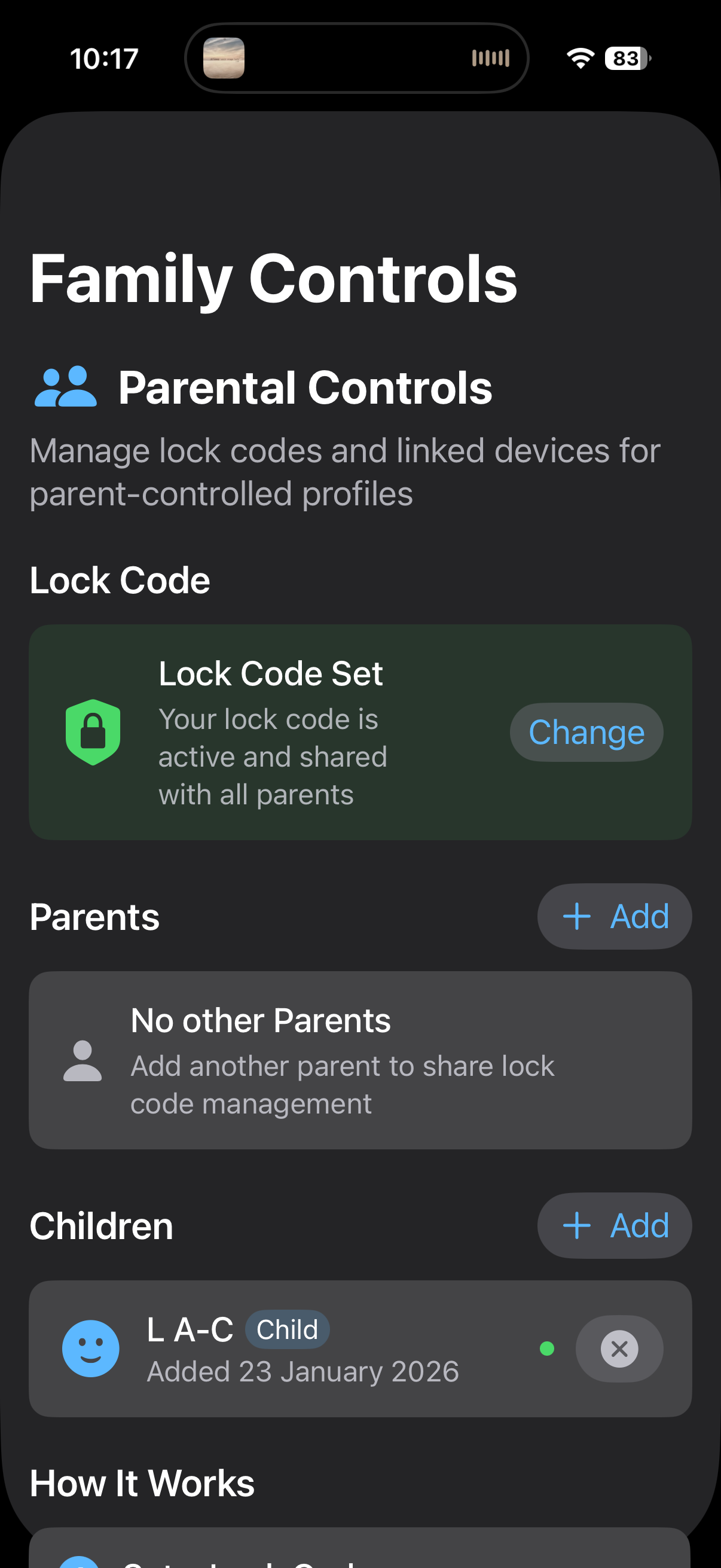
Full control over family settings. Lock profiles directly on your child's device to set healthy boundaries.
Child Mode
The full app experience with optional parental boundaries. Locked profiles require the family code to edit.
Shared Lock Codes
Sync parent lock codes across your family's devices via iCloud. One code works everywhere.
Location Restrictions
Set where profiles can be stopped - home, school, or anywhere. Location is only checked when stopping, never continuously tracked.
Block Everywhere
Your profiles sync across all your devices. When blocking is on, it's on everywhere — no escape hatch.
Built on Foqos
- 9 proven featuresNFC Blocking
Tap a physical NFC tag to start your focus session. A tangible ritual that makes blocking feel intentional.
QR Blocking
Scan a QR code to instantly activate a blocking profile. Place codes around your home for quick access.
Custom Profiles
Create unlimited profiles with different blocking rules for work, study, sleep, or family time.
Timer Mode
Set focus sessions for specific durations. The app handles the rest - no willpower required.
Website Blocking
Block distracting websites and apps across profiles. Set it once, enforce it always.
Habit Tracking
Build focus habits with streaks and insights. Watch your family's focus time grow together.
Live Activities
See your current focus session on the Lock Screen and Dynamic Island. Always know your status.
Privacy-First
Your data stays on your devices. No accounts, no tracking, no selling your focus habits.
Open Source
Fully open source on GitHub. Audit the code, contribute, or fork it for your own needs.
Focus for your family in
three simple steps
Setting up Family Foqos takes just minutes. No complicated setup, no external accounts - just your Apple ID and Family Sharing.
Set a Family Lock Code
Enable Parent Mode and set a lock code. This code syncs via iCloud to all family devices, so you only need to remember one.
Kids Create Profiles
Children set up their own focus profiles on their devices - homework time, bedtime, screen-free dinner. Each profile blocks different apps and websites.
Lock the Profiles
Use the family lock code to lock specific profiles. Kids can activate locked profiles but can't edit the rules - only parents can unlock and change settings.
Ready to bring focus to your family?
Get the App
Why choose
Family Foqos?
See how Family Foqos stacks up against the original Foqos, Apple Screen Time, and other focus apps on the market.
| Feature | F Family Foqos | F Original Foqos | | |
|---|---|---|---|---|
| NFC/QR Physical Blocking | ||||
| Custom Profiles | ||||
| Timer Mode | ||||
| Website Blocking | ||||
| Live Activities | ||||
| Parent Controls NEW | ||||
| Child Mode NEW | ||||
| Lock Codes for Profiles NEW | ||||
| Shared Lock Codes via iCloud NEW | ||||
| Location-Based Override Restrictions NEW | ||||
| Block Everywhere (Device Sync) NEW | ||||
| Open Source | ||||
| Privacy-First (No Tracking) | ||||
| No Subscription Required |
Family Foqos combines the best of the original Foqos with new family-focused features.
Common
questions
Everything you need to know about Family Foqos. Can't find what you're looking for? Check our GitHub Issues for help.
What is Family Foqos?
Family Foqos is a focus and screen time management app built for families. It extends the original Foqos app with parent controls and lock codes. Parents can lock specific profiles on their children's devices so kids can activate focus sessions but can't change the rules - bringing intentional screen time to the whole family.
How do lock codes work?
Parents set a lock code that syncs across family devices via iCloud. Profiles are created like normal on the child's device. When a profile is locked, children can still activate it and use it for focus sessions, but they can't edit the blocked apps, websites, or timer settings. Profiles themselves stay on each device - only the lock code is shared across the family.
Can children create their own profiles / policies?
Yes, they can create profiles in addition to the locked profiles. This is useful for them to develop their own discipline and daily routines.
Is my family's data private?
Absolutely. Family Foqos is privacy-first by design. All data stays on your devices and your private iCloud account. We don't run servers that store your data, we don't track usage patterns, and we don't sell any information. The app is fully open source, so you can verify this yourself.
Do I need NFC tags or QR codes?
No - NFC and QR features are optional but powerful. You can use Family Foqos entirely through the app interface. However, physical triggers like NFC tags and QR codes add a tangible ritual to focus sessions. Many families place QR codes in study areas or use NFC tags as focus 'keys' for children.
What devices are supported?
Family Foqos is available for iPhone and iPad running iOS 17 or later. NFC blocking requires an iPhone (iPads don't have NFC readers), but QR blocking and all other features work on both devices.
Can Family Foqos be used to lock the profiles of other adults?
No. Family Foqos has a built-in safety feature: profiles can only be locked on devices signed in to iCloud with an Apple Family account designated as a 'child' account. This means the app cannot be installed on an adult's device and used to control them without their consent. Apple's Family Sharing structure ensures that only parents/guardians can manage child accounts. This design intentionally prevents misuse in coercive control or domestic abuse scenarios.
Is Family Foqos free?
Family Foqos will be free and open source, just like the original Foqos. There are no subscriptions, no ads, and no hidden fees. If you find value in the app, we encourage donations to Common Sense Media, an organization that helps families navigate the digital world.
How is this different from Apple Screen Time?
Apple Screen Time focuses on limits and restrictions. Family Foqos focuses on intentional focus sessions. With Screen Time, you set daily limits and hope your child doesn't find workarounds. With Family Foqos, you create purposeful focus profiles - homework time, bedtime, dinner - that feel less like punishment and more like positive habits. Plus, NFC/QR blocking adds a physical, ritual element that Screen Time can't match.
Can children bypass locked profiles?
Locked profiles prevent children from modifying settings, changing blocked apps/websites, or deactivating the profile through normal means - the parent passcode is required for those actions. However, children can still use the Emergency Access feature on locked profiles, just like any other profile. Emergency unblocks are limited (3 per reset period) and work identically regardless of whether a profile is locked.
What if I need to unblock something in an emergency?
The Emergency Access feature lets you end any active blocking session immediately - no NFC tag, QR code, or passcode required. It's designed for genuine emergencies when you need your phone right now. To prevent overuse, you get 3 emergency unblocks per reset period (configurable from 2-8 weeks). Once you've used all 3, you'll need to wait for the reset or use your normal unblock method. Emergency Access works the same way for all profiles, including locked ones.
Still have questions?
Ask on GitHub Issues
Ready to bring focus
to your family?
Download Family Foqos from the App Store to bring intentional screen time to your family.